

No products in the basket.
You don’t need to spend money to get great synth sounds. Some of the best synths around are completely free, and a few of them can easily compete with plug-ins that cost hundreds. I’ve picked five free synth VSTs I’d recommend to every producer, from first steps in sound design to deep, professional sound design. All of them run in Ableton Live and other DAWs, on Mac and Windows.
1. Lil Sensei: the synth that teaches you sound design
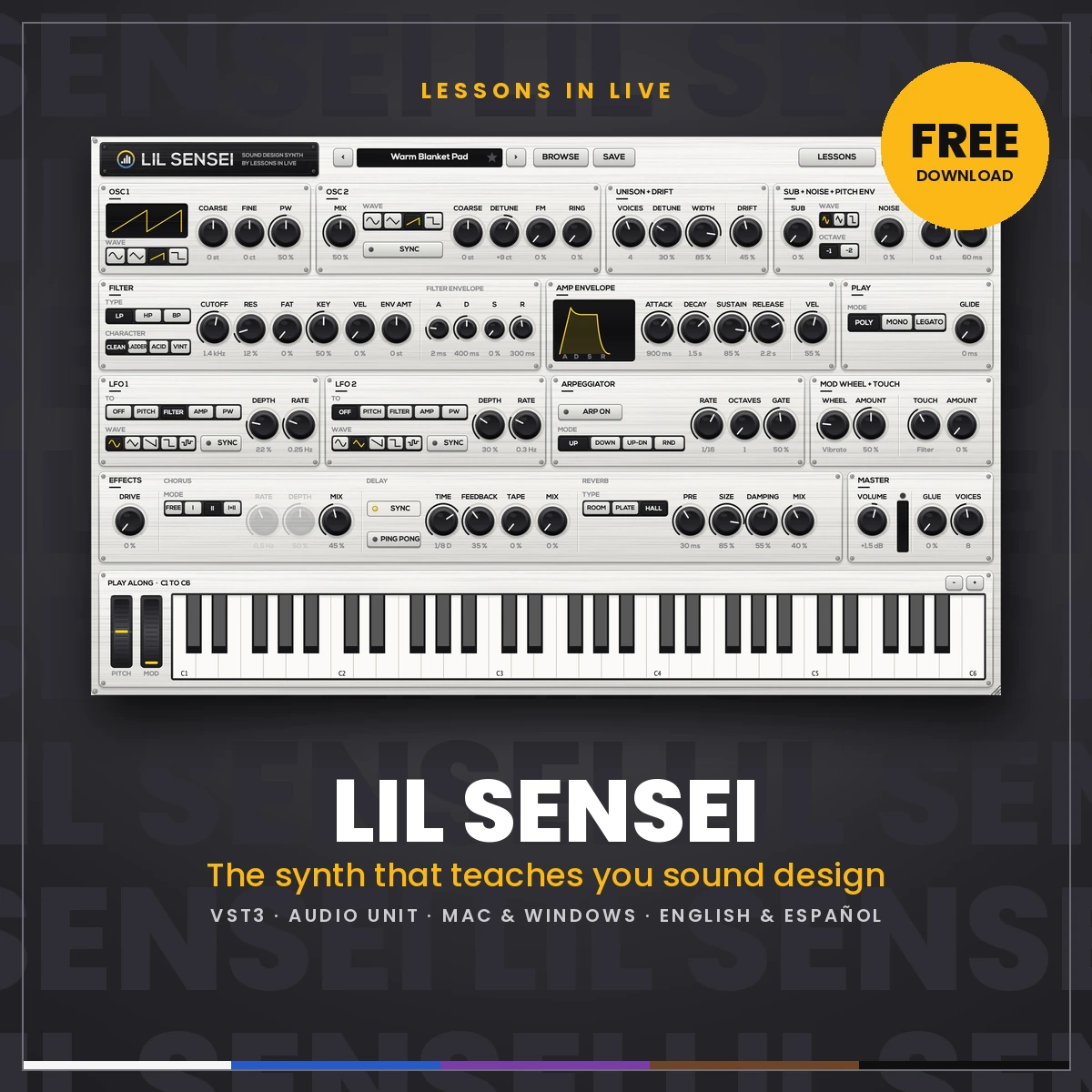
Yes, this one is mine, but hear me out. Most synths throw 50 knobs at you at once. Lil Sensei starts as an empty panel. You answer a short question about a control, it appears, and you hear a before / after example of what it does. Step by step you build a complete synth, and you understand every part of it.
- Type: subtractive synth with two oscillators (sync, FM and ring modulation), a sub, unison, four filter characters (Clean, Ladder, Acid, Vintage), two LFOs, an arpeggiator and effects.
- Learn: 71 lessons in 10 chapters and 7 step-by-step tutorials (house bass, warm pad, pluck, kick, riser, lead and arp), in English and Spanish.
- Sounds: 700 presets.
- Formats: VST3 and stand-alone for Mac and Windows, Audio Unit on Mac. No serial, no trial: just free.
- Best for: anyone who wants to finally understand what all those knobs do.
2. Vital: the free wavetable powerhouse
Vital is a spectral-warping wavetable synth that’s often compared to Serum. The free Basic version gives you the full synth with 75 presets and 25 wavetables; paid tiers only add more sounds. What makes it great for learning is that you see everything: drag a modulation onto a knob and you watch it move in real time.
- Type: wavetable.
- Formats: Mac, Windows and Linux.
- Best for: modern basses, leads, plucks and evolving pads.
- Get it: vital.audio
3. Surge XT: endless sound design, open source
Surge started life as a commercial synth and is now free and open source, kept alive by a very active community. It combines many types of oscillators, a long list of filters, a deep modulation system and built-in effects, with MPE and microtuning on top. There’s no paid version and no feature limit. The interface takes some getting used to, but there’s almost no sound it can’t make.
- Type: hybrid (several synthesis methods in one).
- Formats: Mac, Windows and Linux. No account needed.
- Best for: producers who love to dig deep.
- Get it: surge-synthesizer.github.io
4. Dexed: the legendary DX7, for free
The Yamaha DX7 is all over classic house: those glassy electric pianos, bell sounds and punchy FM basses. Dexed is a free, open-source FM synth modelled closely on the DX7, with six operators and 32 algorithms. It even loads original DX7 patches, so you have thousands of classic sounds available. FM is hard to program from scratch, but start from a preset and tweak, and it’s very light on your CPU.
- Type: FM (frequency modulation).
- Formats: Mac, Windows and Linux.
- Best for: electric pianos, bells, metallic stabs and FM basses.
- Get it: asb2m10.github.io/dexed
5. TAL-NoiseMaker: the classic analog-style workhorse
Sometimes you just want a fat, warm, simple synth. TAL-NoiseMaker is a free subtractive synth with three oscillators (including a sub), a self-oscillating filter and built-in chorus, reverb and bitcrusher. It’s light on your CPU and sounds great on basses and leads: the perfect synth to practise the basics of subtractive synthesis.
- Type: subtractive (analog style).
- Formats: Mac and Windows.
- Best for: basses, leads and classic analog sounds.
- Get it: tal-software.com
Also worth a look
- Odin 2: a free, open-source semi-modular synth with three oscillators per voice and Moog-style and Korg 35-style filters.
- Zebralette 3: a free spectral synth from u-he, a little brother of Zebra 3.
- OB-Xd: an Oberheim OB-X-style synth for fat pads and strings. Note: the free version is for personal use; for released music you need the paid version.
How to use a free VST in Ableton Live
- Download the synth from its official website (never from a random download site) and run the installer.
- In Live, open Settings › Plug-Ins (Preferences in Live 11), turn on Use VST3 Plug-In System Folders and click Rescan.
- Find the synth in the browser under Plug-Ins and drag it onto a MIDI track.
My tip: don’t install ten synths at once. Pick one, learn it well, and make a few tracks with it. Knowing one synth inside out will improve your music more than a folder full of plug-ins you never open. New to sound design? Read Sound Design Explained first, it explains the types of synthesis these synths use.
Ready for the next step?
When you’ve outgrown the free ones, try the Lessons in Live plug-ins, each with a free 30-day trial: Driftwood (a warm, hands-on polysynth), Powerhouse (wavetable and granular) or Call and Response (two synths in conversation). And if you want to learn sound design and production with me personally, have a look at my online courses or plan a free intake.