

No products in the basket.

It started with a simple question. After a gig or a livestream, students would send me their recorded set and ask: “Camiel, could you level this for me?” Then friends from the underground scene here in Valencia started asking the same thing. They had played a great night, recorded it, and wanted to share it as a mix. But some tracks came in too quiet, others too loud, and the recording felt uneven from start to finish.
I know that problem very well. After more than 25 years of DJing, I have recorded a lot of sets myself, and almost every recording needs some work before it sounds like a finished mix. So I did what I always did: open Ableton Live, drop in the recording, and draw volume automation by hand, track by track. For a two-hour set that easily takes an hour. Doing it for myself was fine. Doing it for everyone who asked was not.
That is why I built Level Me!, a small desktop app from Lessons in Live that does this job for you in seconds.
What does “leveling” a DJ set mean?
When you record a DJ set, every track has its own loudness. One record is mastered hot, the next one is an older release that sits a few decibels lower. In the club you correct that with the gain knob and your ears, but you don’t always get it perfect, and in the recording every difference is audible. On headphones or in a car, the listener keeps reaching for the volume.
Leveling means riding the volume through the whole set so every track plays at roughly the same level. It is the same thing a mixing engineer does with a fader, or what you do when you automate the volume of a recording in your DAW.
Why not just normalize or put a compressor on it?
This is the question I get the most, and it is exactly why I wanted to make a dedicated tool.
- Normalizing only changes the volume of the whole file. The loud track stays loud and the quiet track stays quiet; the differences between tracks are still there.
- A compressor or limiter on the master squashes everything. It makes the quiet parts louder, but it also flattens your breakdowns, the build-ups and the dynamics inside every track. A set lives from those moments.
What you really want is something that only corrects the differences between tracks, and leaves the dynamics inside each track alone. A breakdown should still feel like a breakdown.
How Level Me! works
You open your recorded set in Level Me! and it listens through the whole recording. Under the hood it measures the loudness of the set over time and works out where one track ends and the next one starts, and how loud each part is compared to the rest. The important part: it tells the difference between a quieter record and a quiet moment inside a record, like a breakdown. Only the first gets corrected.
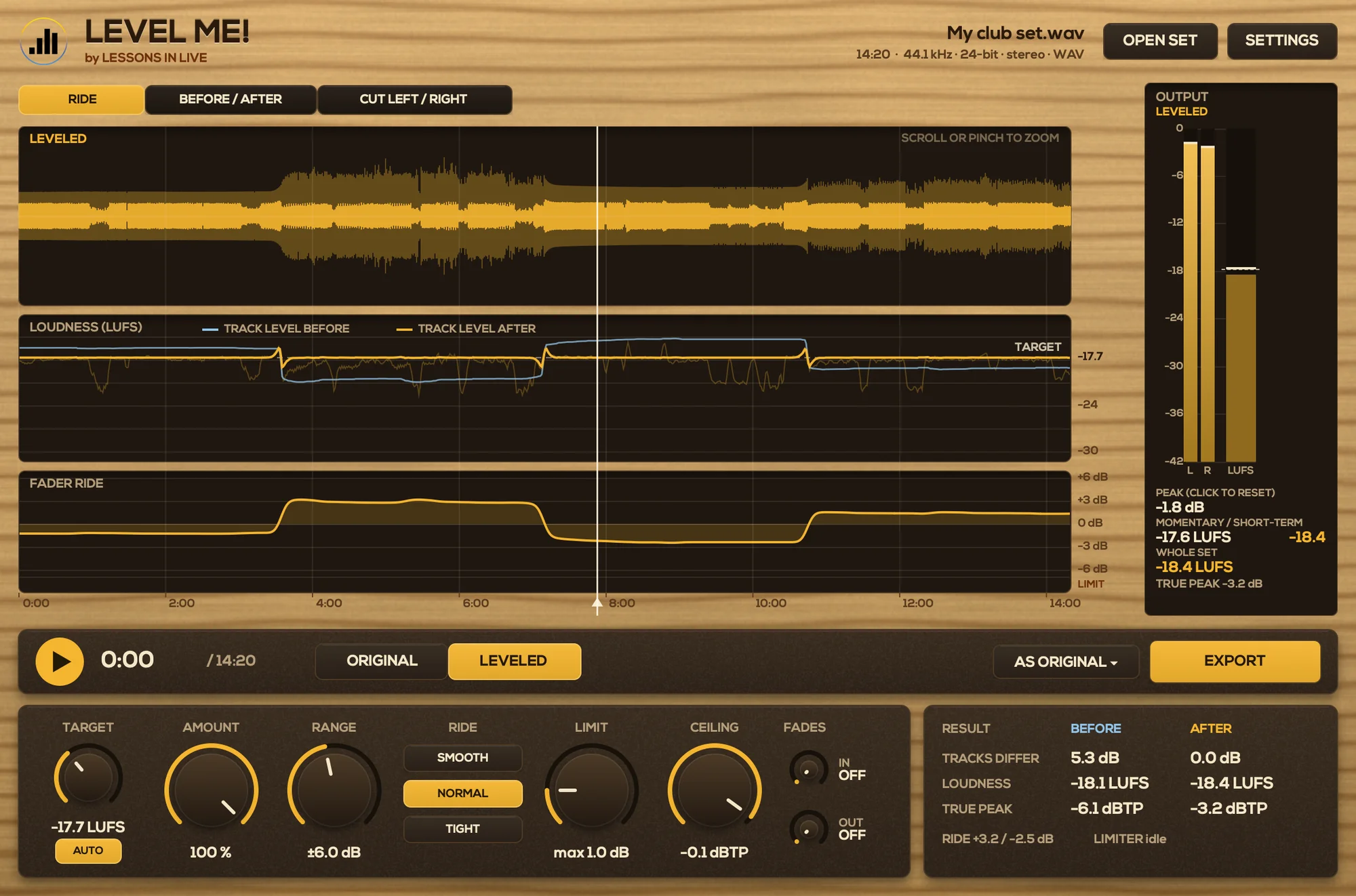
From that analysis it draws a smooth fader ride, just like you would do with volume automation in Ableton, only it takes seconds instead of an hour. Quiet records come up as far as their peaks allow, loud ones come down, and a transparent safety limiter catches the rare peak so nothing goes over the ceiling. It is leveling, not a loudness war.
Then it writes a new file in exactly the same format you put in: the same sample rate, the same bit depth and the same metadata. A two-hour set is measured in a few seconds and written in under ten.
See and hear what changes
I didn’t want a black box, so you can see everything Level Me! does:
- A waveform with the loudness of every track before and after, and the fader ride drawn over it.
- A before/after view and A/B playback, so you can switch between the original and the leveled version at any moment.
- A mastering-style output meter that shows the loudness and the true peak of the result.
- Two knobs for a smooth fade in and fade out, right where the music starts and stops.
- Drag the edges to cut off the silence or chatter at the start and end of your recording, or let Level Me! find where the music starts and ends for you.
The app speaks English and Spanish and comes in three looks: wood, light and dark.
No DAW needed
This is the part my students like most. You don’t need to open Ableton Live, set up a project, import a two-hour file and draw automation. You open the app, open your set, check the result and export. That’s it. It works on Mac (macOS 11 or newer, Apple Silicon and Intel) and on Windows 10 and 11.
For me it means I can level a set straight after a gig and send it to the promoter or upload it the same night. For my students it means one less technical hurdle between playing a set and sharing it.
Who is it for?
- DJs who record their sets and want to share them as a clean mix on SoundCloud, Mixcloud or YouTube.
- Radio and podcast hosts who play recorded mixes from different DJs.
- Live performers who record their shows and want an even result without a mastering session.
- Anyone who has ever spent an evening drawing volume automation over a recording.
Try Level Me! for free
You can try Level Me! free for 30 days: download it, open your sets and hear the difference. No account or serial needed. After the trial you can still open sets and listen; exporting needs a serial. A serial costs €10 and works on two computers, your desktop and your laptop, and updates are free and announced inside the app.
Download the free trial of Level Me! here. And if you have ideas for the next version, let me know: this app exists because people asked me for it, and I’d love to keep building it with you.